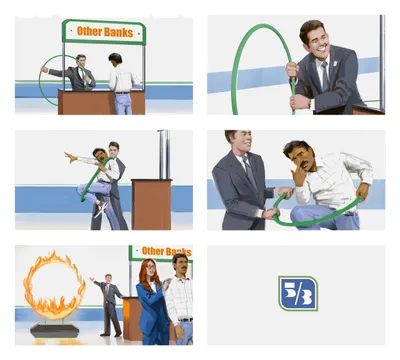
Bringing Animatics to Life: A Comprehensive Guide to Visual Storytelling
Image source: Storyboarding Insights & Visual Storytelling | Paul Temple Studios
Image source: Storyboard vs Animatics: Animation Essentials Explained!
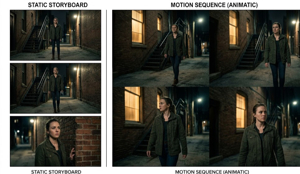
Image source: What is an Animatic? Definition, Examples, and Uses | M Studio
An animatic is a timed video version of a storyboard: a sequence of still panels placed on a timeline with sound, rough motion, and editing rhythm so the story can be judged as a moving piece rather than a set of drawings. 1, 2 In practice, it is the fastest way to find out whether a scene plays clearly before committing to production.
Key differences: storyboards → animatics
| Aspect | Storyboard | Animatic |
|---|---|---|
| Form | Static drawings/sketches in sequence 3, 4 | Timed video sequence of those drawings 1, 5 |
| Motion | None (still frames) 6, 7 | Basic movement, transitions, camera pans 2, 4 |
| Sound | Written notes only 3 | Voiceovers, music, sound effects added 2, 8 |
| Purpose | Visual blueprint: composition, camera angles 3, 7 | Test timing, pacing, and story flow before production 2, 9 |
A storyboard answers, “What happens in each shot?” An animatic answers, “How does the scene actually feel when those shots are played in order?”
Why animatics matter in visual storytelling
Animatics are especially useful in projects where timing changes the meaning of a shot. Comedy depends on pauses. Action depends on acceleration and impact. Dialogue scenes depend on when a reaction cut lands. A panel sequence can look clear on paper and still feel rushed, flat, or confusing once it moves.
For filmmakers, the animatic is the first place where composition, duration, and sound begin to work together. A close-up that reads as intense in a storyboard may need two extra beats in the cut to land. A wide shot that feels elegant on paper may drag unless it is shortened or paired with a stronger audio cue. That makes the animatic a practical previsualization tool, not just a presentation format.
How animatics bring storyboards to life
- Import & timeline: Scan storyboard images and import them into video-editing software (e.g., iMovie, Adobe Premiere, After Effects, Final Cut Pro X, Toon Boom), then lay them out on an animation timeline. 1
- Add timing: Give each panel a specific duration based on dialogue or action, creating realistic pacing. 10, 1
- Add audio: Import recorded dialogue, music, voiceover, or sound effects and align them with the visuals. 8, 1
- Add rough motion: Apply basic movement like pans, zooms, or transitions to simulate camera work and action. 2, 4
The result is a “rough cut” of a film or sequence—essentially a slideshow enhanced with timing, sound, and basic movement—that reveals how the story will play before full animation or filming. 9, 2
What makes an animatic work
A strong animatic is not about polish. It is about clarity.
- Readable shot order: The viewer should always know where they are in the scene.
- Accurate pacing: The duration of each panel should match the energy of the moment.
- Clear audio hierarchy: Dialogue must stay intelligible, while music and effects support rather than fight it.
- Enough motion to suggest camera grammar: A slow push-in can emphasize tension; a quick cut can sharpen a reveal.
- Consistent framing notes: If a panel depends on a tilt, pan, or rack focus, that intention should be obvious in the timeline or notes.
Many productions keep the motion minimal and use the animatic mostly to test editorial rhythm. Others build more elaborate versions with temp sound design and rough camera movement. The level of finish should match the decision being tested.
Common mistakes
Overpolishing too early
An animatic does not need rendered effects, detailed animation, or final color. Extra finish can hide timing problems instead of revealing them.
Ignoring silence
Blank spaces in an animatic can be useful. They show where a pause, reaction, or breath belongs. Filling every gap with music often makes the sequence less truthful.
Using generic timing
If every panel lasts the same number of seconds, the scene usually feels mechanical. Action beats, dialogue beats, and reaction beats need different durations.
Treating storyboard art as final camera framing
A storyboard panel may be compositional shorthand. In the animatic, that frame sometimes needs to shift, breathe, or cut earlier to support the scene’s rhythm.
From animatic to production
In both live action and animation, the animatic becomes a planning document. It can guide shot lists, help estimate scene length, reveal coverage gaps, and expose where a sequence needs more inserts or reaction shots. Because the structure is already tested, production decisions become more deliberate and less dependent on guesswork.
A clean workflow is simple: storyboard first, then animatic, then revise the boards again if the timing exposes a problem. In practice, the best animatics are often the ones that make the storyboard better.
Quick definition
Storyboard: a sequence of still images that designs a scene shot by shot.
Animatic: those storyboard images edited into a timed audiovisual sequence that tests pacing, movement, and story flow before production.
References
-
Storyboard vs Animatic: Complete Comparison Guide - OPSIS AI
-
What is an Animatic? Definition, Examples, and Uses | M Studio
-
What Is The Difference Between An Animatic And A Storyboard? - The Animation Reel
-
Storyboarding Insights & Visual Storytelling | Paul Temple Studios
-
Bringing Your Story to Life: A Guide to Making Animatics - Oreate AI