Crafting the Perfect Shot List: A Step-by-Step Guide for Filmmakers

Image source: Shot List Software & AI Shot List Generator

Image source: Studiovity | Shotlist Tutorial
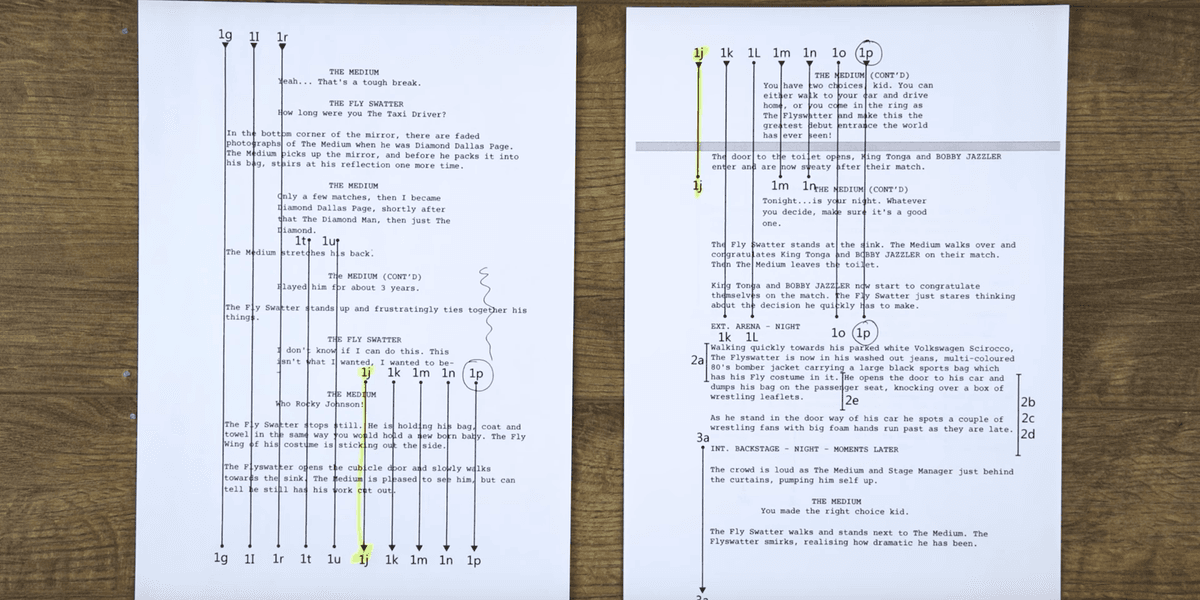
Image source: Shot Lists and Script Lining: Preparing Your Screenplay For Your …
Building a shot list from a screenplay is a 5-step process: break down the script into beats, choose shot types for each moment, organize by shooting order (not narrative order), add technical details (equipment/lens/movement/timing), and share with your crew for collaboration. 1, 2
Step-by-Step Guide
1. Start with Script Breakdown
- Read the script scene-by-scene and identify individual beats (moments/emotional shifts) 1
- Ask: “What’s the emotional focus of this moment?” to guide framing choices 1
- Note action, dialogue, and what needs to be captured visually 2
2. Choose Shot Types for Each Beat
Common shots and what they convey:
| Shot Type | Purpose |
|---|---|
| Wide Shot (WS) | Establishes setting/shows scale 1, 2 |
| Medium Shot (MS) | Characters from waist up; dialogue 2 |
| Close-Up (CU) | Emotions and detail 1, 2 |
| Over-the-Shoulder (OTS) | Perspective in conversations 2 |
| Tracking Shot | Dynamism following motion 1 |
For every beat, decide what shot fits best. 2
3. Organize by Shooting Order
- Group shots by scene, then reorder scenes by shooting order (not script order) 2, 1
- This streamlines scheduling, minimizes setups, and maximizes location/actor efficiency 2
4. Add Technical Details
For each shot, include:
| Column | What to Add |
|---|---|
| Shot # | Scene number + shot number (e.g., 12A, 12B) 2 |
| Description | Action/characters (e.g., “Character enters room”) 2 |
| Shot Type | WS, MS, CU, etc. 2 |
| Camera Angle | High, low, eye-level 2 |
| Movement | Static, dolly, handheld, pan 1, 2 |
| Equipment | Tripod, gimbal, lens (mm) 2 |
| Time | Estimated setup time (e.g., 20 min) 2 |
| Notes | Props, lighting, audio notes 2 |
5. Collaborate with Crew
- Share with cinematographer (DP) for lenses/lighting/equipment 1, 2
- Share with 1st AD for scheduling/setup times 1, 2
- Share with producer for budget/location needs 2
- Be open to adjustments—they’re expected on set 1
Tools to Help
- Free templates: Look for spreadsheets with shot type, angle, description, notes columns 1
- Software: StudioBinder, ShotKraft (AI-generated shot lists), Script & Pad, Studiovity 3, 4, 5
Key Tips
- Start with the script’s emotional beats, not the camera 2
- Think in coverage (enough angles for editing), not just “hero shots” 2
- Be specific with technical details to avoid confusion 2
- Leave room for flexibility—the shot list is a guide, not a rulebook 1, 2
References
-
Filmmaking Tutorial - How To Create A Shotlist From A Screenplay
-
Shot Lists and Script Lining: Preparing Your Screenplay For Your …
-
How do you approach the transition from script to shot list?
-
Filmmaking Tutorial - How To Create A Shotlist From A Screenplay