Unlocking the Magic: A Comprehensive Guide to In-Camera VFX
Image source: How In-Camera VFX is Changing the Game in Filmmaking?
Image source: 5 FAQs About In-Camera Effects
Image source: What Are In-Camera Visual Effects? - Tom’s Networking
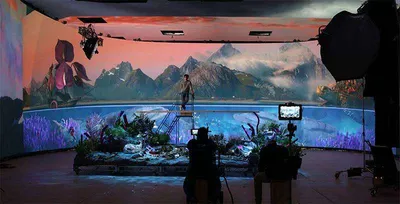
In-camera VFX (also called ICVFX or in-camera visual effects) is a filmmaking technique where visual effects are captured directly in the camera during the shoot, rather than being added later in post-production. The most common modern implementation uses LED volumes (massive curved screens) displaying real-time 3D environments.
In practical terms, the camera records a finished-looking background, lighting interaction, and often some final reflections in the same exposure that captures the actors. That is what makes in-camera VFX different from a pure green-screen workflow: the effect is not just composited afterward, but physically present in the frame at the time of photography.
How it works (modern LED volume method)
| Component | Role |
|---|---|
| LED wall/volume | Displays CGI backgrounds in real-time around actors 1, 2 |
| Real-time renderer | Engines like Unreal Engine generate the virtual world instantly 3, 2 |
| Camera tracking | Live tracking knows the camera’s position/orientation 2 |
| Off-axis projection | Renders the background from the correct perspective for each camera angle 2 |
The result: actors and physical props are filmed with the virtual background already visible, creating seamless integration with real reflections, lighting, and depth of field. 2, 4
The method depends on three things working together: the physical set in the foreground, the LED wall in the background, and the tracking system that keeps the virtual world aligned to the lens. When the camera pans, dollies, or cranes, the rendered background shifts in real time to preserve parallax. That movement is what sells the illusion of a real environment rather than a flat screen behind performers.
A useful way to think about it is that the LED volume behaves like a giant, programmable practical backdrop. Instead of shooting a blank surface and hoping compositing will solve everything later, the production captures a version of the scene that already contains much of the final image logic. The lighting on the actors can also be driven by the image on the wall, which is especially valuable for night exteriors, neon interiors, vehicle interiors, and reflective surfaces.
How in-camera VFX compares with traditional green screen
| Traditional green screen | In-camera VFX |
|---|---|
| Background added in post-production | Background captured live on set 5, 4 |
| Actors stare at blank green wall | Actors see the actual environment 2 |
| Reflections/shadows must be faked | Real reflections from LED walls 6 |
| Heavy compositing work later | Less compositing in post 7, 8 |
| Non-visual pipeline (VFX after shooting) | Non-linear pipeline: VFX begins in pre-production 7, 8 |
The biggest difference is not just where the background is created, but when the creative decisions happen. Green screen often pushes framing, lighting, and environment design downstream into post-production. In-camera VFX pulls those decisions forward, so layout, lensing, color, and blocking are planned around the final image before principal photography begins.
That shift brings real production advantages. Actors can react to the environment instead of imagining it. The camera department can judge exposure against the real background. The art department can coordinate the physical set with the virtual set so edges, silhouettes, and practical props blend correctly. For complex scenes, this can reduce the number of clean-up shots and matte extractions later.
Classic in-camera effects
The term also includes traditional optical and physical tricks captured without digital rendering:
- Forced perspective (miniatures appear giant) 6, 9
- Matte paintings 10
- Double exposure 11
- Split diopters 11
- Lens flares/filters 10, 11
These older methods are still relevant because they solve the same problem from a different era: creating impossible imagery inside the camera whenever possible. Forced perspective changes scale through set design and camera placement. Matte paintings extend locations beyond what exists physically. Double exposure layers images onto the same strip of film. Split diopters keep two planes of action in acceptable focus at once, which can make a practical set feel more expansive or surreal.
Where in-camera VFX works best
In-camera VFX is strongest when the environment has a lot of controllable background information and a meaningful amount of interactive light. Common use cases include:
- vehicle interiors and cockpit scenes
- studio-bound night exteriors
- sci-fi corridors and command rooms
- fantasy landscapes seen through windows or portals
- scenes with water, glass, chrome, or polished surfaces
It is less efficient when the shot requires large amounts of dynamic action outside the volume, heavy interaction with physical weather, or extensive coverage that would force frequent relighting and background swaps. The LED wall is a tool, not a replacement for every visual effects workflow.
Practical production considerations
The method works best when the scene is designed for it from the beginning. Lens choice matters because wide lenses reveal more of the volume and can expose the limits of the stage. Camera height and movement must be planned so the virtual horizon and background motion remain believable. Physical set extensions need to hide the seam between the real foreground and the displayed environment. Color management also matters, because the LED wall must hold consistent brightness and chroma behavior across the shoot.
A common mistake is treating the wall as if it were merely a prettier green screen. That approach usually fails. In-camera VFX requires previsualization, accurate tracking, art-direction continuity, and close coordination between camera, VFX, and lighting departments. If the background is not blocked, lit, and rendered with the shot in mind, the result can look obviously synthetic even though it was captured in-camera.
Famous examples
- The Mandalorian (Disney+) pioneered LED volume ICVFX at scale 1
- Justice League, 1917, Dune used virtual production 1
These productions showed how in-camera VFX can support both spectacle and efficiency. In some cases the technology is used for entire environments; in others it is used selectively for background extension, interactive lighting, or complex driving scenes. The important point is that the technique is not limited to one genre. It is a production method that can be adapted to action, drama, fantasy, and science fiction whenever the shot benefits from seeing the environment live.
This technique fundamentally shifts the VFX workflow: instead of simulations happening after filming, they’re done before filming using game-engine technology, enabling directors to see near-final results during production. 8, 12
Why filmmakers use it
In-camera VFX is valuable because it combines the immediacy of practical effects with the flexibility of digital environments. The shot is often closer to the final image at the moment of capture, which can improve performance, reduce uncertainty on set, and shorten parts of the post-production pipeline.
For cinematographers, the main benefit is control. The background is no longer a theoretical element to be fixed later; it becomes part of the lighting and composition problem on the day. For directors, it can make blocking and performance more concrete. For VFX teams, it can reduce the amount of invisible work needed after the shoot and improve continuity between what was planned and what was photographed.
Common pitfalls
- Treating the LED wall as a source of unlimited brightness rather than a display with its own limits
- Using backgrounds that are too detailed or too dark for the camera and lens package
- Ignoring reflections on costumes, windows, and glossy props
- Planning coverage without accounting for tracking boundaries or visible seams
- Leaving too much of the final look to be “fixed in post”
A strong in-camera VFX shot is usually designed around what the camera can actually see, not around what the software can theoretically render. When the screen, lens, set, and motion are all aligned, the result is convincing precisely because it is not trying to hide the image-making process.
References
-
In-Camera VFX in Unreal Engine | Unreal Engine 5.6 Documentation | Epic Developer Community
-
What is In-Camera VFX Virtual Production? Nouva MASTERCLASS - Unreal Engine - Vp Toolkit - Ian Fursa
-
Impact of In Camera Visual Effects on Directors of Photography …